The Real Reason Coding Agents Get More Done
Coding agents such as Claude Code and Cursor can do more than agents available inside most SaaS products. You can give a coding agent an issue, and after some time it can return with changed files, tests and a pull request. But in many SaaS products, AI can only answer a question or generate some text.
Why is there such a big difference?
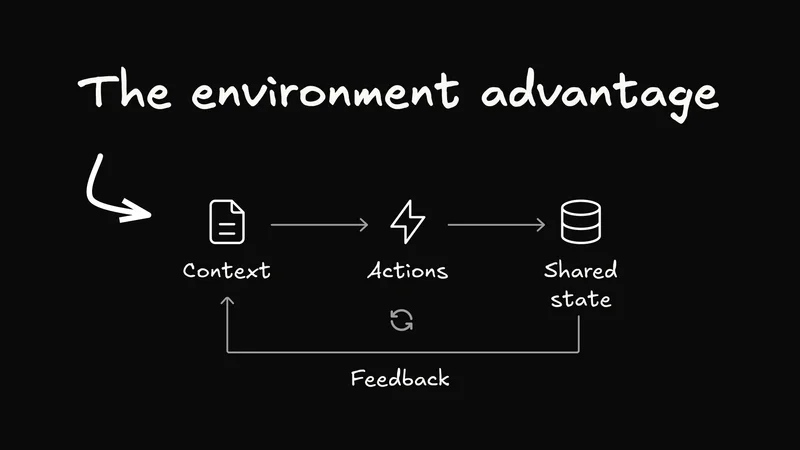
One reason can be the underlying model, but the model is not the complete answer. Unlike most SaaS app agents, coding agents have access to an environment where they can understand the task, take actions, check the result and try again. Let's look at this environment and what SaaS products can learn from it.
The model is only one part of the system
For example, ask a coding agent to rename an API across a codebase. It can search for the API definition, find all its usages, update the code, run the test suite and fix any failures. Finally, it can leave the complete change on a branch for review.
Now ask an AI assistant inside a CRM to “clean up our stale sales pipeline.” It may explain what a clean pipeline should look like. It may also generate a checklist or suggest which records can be updated.
But can it actually update those records? Can it preserve important exceptions, show what it changed, request approval and recover when a validation fails?
In most products the answer is no. So the difference is not only model intelligence. A coding agent has a much better work environment. It can inspect the state of a system, take actions, observe the results and keep iterating.
That also means a single task can generate a surprising amount of activity before the final result. A coding agent might search hundreds of files, make multiple edits, run tests repeatedly, read CI output, push commits, open a pull request and respond to review comments.
GitHub’s recent numbers give us a glimpse of this at scale. In the first five months after GitHub released Copilot coding agent, developers used it to merge more than one million pull requests. In 2025, average monthly pull requests merged on GitHub increased from 35 million to 43.2 million, while monthly code pushes increased from 65 million to 82.19 million.
These numbers don't prove that agents caused all of this growth, but they illustrate an important point: when agents can operate inside a real environment, the amount of activity behind each final output can be much larger than the output itself.

Why coding environment works so well for agents
A coding environment gives an agent five important things:
1. Context is already available
A repository contains code, configuration, tests, documentation and project conventions. Issues and pull requests provide more information about the task. An agent can search this context when needed instead of depending only on the text written in the prompt.
Thanks to a history of PRs, it knows not just what changed over time, but also why the change occurred.
In many SaaS products, similar context is distributed across multiple screens, tabs and component state. A human can see which customer is selected and which filter is active, but an agent may only receive a chat message. Additionally, the reason for a system being the way it is may be buried in Slack or another app altogether.
2. Agents can take concrete actions
Coding agents can read and write files, search code, execute a compiler, run the test suite, use CLI tools and call APIs. Each action has a clear input and output.
A typical SaaS AI can retrieve information and generate a response, but it may not be connected to the real actions of the application. For an agent to be useful, it should not only know what to do. It should also be able to do it.
3. Humans and agents share the same state
Git gives humans and agents a shared version history. The agent changes the same files which a developer will review. A branch isolates the change, a diff shows exactly what changed and a pull request gives a clear boundary for review.
It also makes mistakes easier to reverse. An agent can try a solution in a separate branch without directly changing the main version of the product.
4. Feedback is clear
A failing test provides a direct signal that something is wrong. It can point to an assertion, error message, exit code or a particular file. Linters, type checkers, security scanners, CI and human reviews provide more feedback.
This is very different from only telling an agent that the answer was “not good.” The agent receives information which it can use in the next step.
5. Agents can iterate
After receiving feedback, the agent can modify the code and run the checks again. It can continue this loop until the tests pass or it needs help from a human.
So the main advantage is not that writing code is easy. Software development already provides a complete loop for delegating and checking work.
An issue provides the task, a repository provides context, a branch provides isolation, tools provide actions, CI provides feedback and a pull request provides human review. Coding agents use all these components together.
What SaaS products can learn from coding agents
This does not mean every application needs branches, pull requests and CI. For example, nobody wants to create a pull request to reschedule a meeting. But SaaS applications need similar concepts for context, actions, feedback and approval.
Provide complete context
The agent should know the current workspace, selected record, active filters, permissions and recent changes. The user should not be required to copy all application context into every prompt.
Define product capabilities as actions
“Archive invoice,” “schedule meeting” and “publish page” should be clear actions with well-defined inputs. Instead of trying to control the application through simulated clicks, the agent should call these actions directly.
The action should also define exactly what inputs it accepts. For example, a schedule meeting action might require a title, participants, date and time. If the agent provides an invalid or incomplete input, the application should return a clear error so the agent can correct it and try again.
Use a shared state
When the agent updates a record, the UI should show the change. When a human edits a draft or changes a selection, the agent should also receive the updated state.
Give structured feedback
Validation errors, policy checks, audit logs and approval states should be understandable for both agent and human reviewer.
Keep permissions and approval in the same flow
Permissions, confirmations, history and reversibility should apply in the same way whether an action was started by a button, API or agent.
Instead of asking “where can we add a chatbot?”, product teams can ask three questions:
- What actions can be performed inside the product?
- What context and permissions are required for each action?
- How can both human and agent use these actions safely?
Builder.io’s Agent-Native approach
Builder.io’s open-source Agent-Native framework follows this same idea. Instead of building the UI first and later creating a separate set of LLM tools, the application is defined using shared actions. The UI calls these actions and the agent also calls the same actions. The same definition can also be exposed through HTTP, CLI, MCP or agent-to-agent protocols.
The code syntax doesn't matter as much as ensuring that a team does not build the same capability twice: once for buttons in the UI and once for the agent. Both use the same business logic, data, permissions and audit history.
For example, if publishArticle requires editor approval in the UI, it should require the same approval when an agent calls it. If a user does not have permission to publish, the agent should also not get that permission.
Builder.io’s framework is one implementation of this architecture, but the main idea can also be used without a particular framework. Define one capability and expose it to both the human and the agent.
Applications will have two types of users
SaaS products have generally been designed with one assumption: a human will open the application, find the correct screen and click through the complete workflow. APIs and automation are available, but the UI is still the main way to use the product.
With agents, this assumption is changing. A user may give a task from email, chat or another application. The agent may complete multiple steps in the background. A human may open the UI only when something needs visual checking, approval or a final decision.
Applications built only as a collection of screens will have limited agents. Their AI can explain the work but may not be able to perform it reliably. Applications built on shared actions and shared state can allow a human and an agent to work on the same product together.
Coding agents provide an early example of this future because they already have context, actions, feedback and iteration. They also work within permission boundaries and use branches and review flows that keep the human in control.
The next generation of SaaS products should not only add an AI chatbot on top of an existing UI. They should expose the actual capabilities of the product to agents in the same way those capabilities are available to humans.
The next generation of SaaS products should not only add an AI chatbot on top of an existing UI. They should expose the actual capabilities of the product to agents in the same way those capabilities are available to humans. Teams building agent-native apps are starting from this shared-capability model instead of layering AI onto screens later.